
Governments are now sending WhatsApp, Telegram, and Signal the same notice, for the same reason.
That should tell you something the app-store reviews never did.
In July 2026, India’s IT Ministry sent WhatsApp, Telegram, and Signal essentially the same letter within a week of each other: explain how your username feature isn’t a fraud and impersonation machine. Not one app. Three.
In March, the FBI and CISA put out a joint warning that Russian intelligence services were running credential-phishing campaigns against Signal and WhatsApp users by posing as support staff. Two different apps, two different governments, one message: the scam doesn’t respect your platform loyalty.
That should end the debate people keep having in group chats and security newsletters about which messaging app is “the safe one.” It’s the wrong question, and it’s been the wrong question for a while.
Once, the app was the perimeter
Let’s walk through this with the right eyes. For most of the last decade, messaging app security got discussed like a purchasing decision. WhatsApp had the network effect but leaked metadata to Meta. Signal had the Moxie Marlinspike pedigree and end-to-end encryption on by default. Telegram had cloud sync and the reputation (well… deserved or not) of being the “encrypted” one, propped up by the fact that authoritarian governments kept trying to ban it, which felt like a character reference.
The implicit model was: pick the app with the best cryptographic defaults, and you’ve bought yourself safety. That model made sense when the threat was mass interception, a government or an ISP hoovering up plaintext at the network layer. Against that threat, E2EE-by-default versus E2EE-optional was a real, meaningful line, and Signal earned its reputation by sitting on the right side of it.
Today, the attack rides in on trust, not transport
So, the current wave of messaging scams doesn’t attack the transport layer at all. It attacks the layer above it, the part where you decide whether the person typing at you is who they say they are. Encryption protects the pipe. It says nothing about who’s on the other end.
That’s why the FBI’s Russian RIS campaign worked on Signal and WhatsApp users who had, correctly, chosen apps with strong E2EE. The attackers didn’t break the crypto. They impersonated IT support, talked victims into linking a second device or handing over a one-time code, and walked straight through the front door the encryption was guarding. The lock was fine. Somebody just handed over the key.
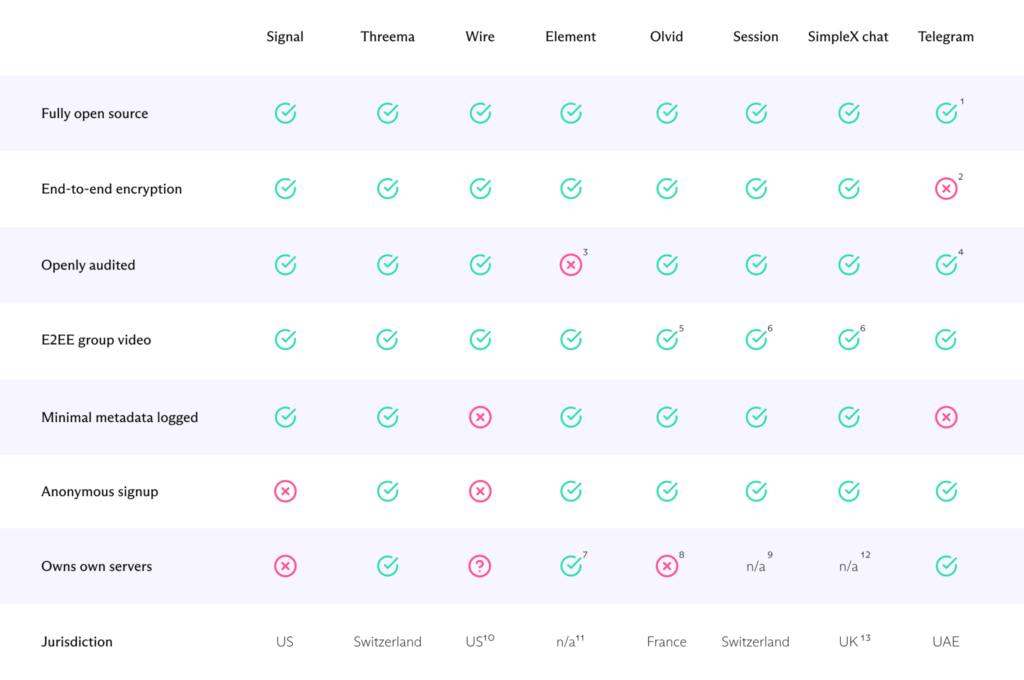
And this is where Telegram earns a specific, factual correction, because it gets misremembered constantly: regular Telegram chats are not end-to-end encrypted by default. Only Secret Chats are, and you have to turn them on yourself, per-conversation, and they don’t sync across devices.
Cloud chats (the ones almost everyone actually uses) are encrypted in transit and at rest on Telegram’s servers, which is not nothing, but it is a different security promise than WhatsApp’s or Signal’s default posture. If you’ve been assuming Telegram chats were E2EE the way WhatsApp’s are, that assumption has been wrong the entire time you’ve held it.
The reveal: identity, not encryption, is the actual gap
None of the apps in the current wave of notices are failing at cryptography. They’re failing at answering a much older question: how do you know the account messaging you is the account you think it is? Usernames without phone numbers make impersonation cheaper, not because usernames are insecure, but because they remove the one weak-but-real signal (this number belongs to a device this person has held for years) that made spoofing at least mildly inconvenient.
Threema‘s approach is worth naming here because it inverts the usual trade-off instead of pretending it doesn’t exist: no phone number or email required to register, minimal metadata by design, and an independently audited cryptographic core, according to Proton’s comparison of WhatsApp alternatives. It doesn’t solve identity verification by magic (nothing does) but it doesn’t quietly borrow your phone number’s residual trust and let you assume that trust is doing more work than it is.
We build social engineering simulations at Baited, and the pattern we test for constantly is exactly this: people evaluate the padlock icon and skip the harder question of who’s holding the other end of the conversation. A verified badge, a familiar name, a group you were “added” to, none of that is identity. It’s set dressing.
What actually holds?
If a contact suddenly wants something urgent, financial, or credential-shaped, the fix isn’t switching apps, but picking up the phone and calling (actually calling, voice, the number you already had) before you do anything the chat asked for. Never hand over a one-time code to anyone, including “support,” including your own IT department, unless you initiated that specific request.
On Telegram specifically, if a conversation is actually sensitive, turn on a Secret Chat and don’t assume the default thread was ever doing that job. And don’t drop personal or financial information into any chat, encrypted or not, just because the interface looks calm and the avatar looks familiar.
The apps aren’t lying to you.
Most of them are just quieter than they should be about where their protection stops and your judgment has to start.
Ok now, here’s the (until tomorrow’s) ultimate Telegram security & privacy guide
You already know that Telegram is a goldmine for social engineers.. massive user base, crypto communities, and “secure” reputation create a false sense of safety – I’ve seen CEOs lose entire wallets, and companies leak secrets, all because someone skipped these settings.
Let’s fix that. Now.
1 – YOUR phone number is your biggest leak!
The Threat: YOUR number connects to Signal, WhatsApp, social media.. one breach cascades everywhere.
| Setting | Path | Recommended Action |
|---|---|---|
| Who can see my phone number | Settings → Privacy and Security → Phone Number | Nobody |
| Who can find me by my number | Same section | My Contacts (or Nobody) |
Pro Tip from the Trenches: Create a Disposable Voice or burner number specifically for Telegram.
Your real number is for people who’ve earned it.
2 – “LAST SEEN” & “ONLINE”: opsec fundamentals
The Threat: attackers map your sleep patterns, work hours, and travel. I’ve used this to time phishing calls (“Your CEO is asleep in London, perfect time to spoof his assistant”).
Settings → Privacy and Security → Last Seen & Online
| Option | When to Use |
|---|---|
| Nobody | Maximum security |
| My Contacts | Balanced approach |
| Never “Everybody” | Unless you enjoy being profiled |
Critical: when you hide yours, you can’t see others’. Accept this trade-off or be fooled!
3 – profile pictures: the OSINT goldmine!
Path: Settings → Privacy and Security → Profile Photo
- set to My Contacts or Nobody
- reverse image search your own photo.. shocked? So were $fauna their very first day with me.
4 – forwarding & groups: STOP that virus!
| Feature | Path | Setting |
|---|---|---|
| Forwarded messages | Privacy → Forwarded Messages | Nobody (stops linkability to your account) |
| Who can add me to groups/channels | Privacy → Groups & Channels | My Contacts |
War story: a client’s employee was added to a “Company Updates” group by an attacker who scraped their username.
Fake CEO message, wire transfer, $47K gone.
This setting prevents that.
5 – 2-Step Verification: non negotiable
Path: Settings → Privacy and Security → Two-Step Verification
What you need:
├── Strong password (16+ chars, unique to Telegram)
├── Recovery email (dedicated, not your main)
└── HINT that helps YOU but not attackers
Never use: “My dog’s name” or “Mom’s birthday”, these are in your Facebook photos (believe me, I just checked yours 😎)
6 – active sessions: the forgotten Kill Switch
Path: Settings → Devices (or Privacy → Active Sessions)
Audit monthly.
Terminate anything unfamiliar.
I’ve found:
- old phones sold on eBay
- browser tabs on library computers
- “Telegram Web” sessions from phishing sites
Enable: Terminate all other sessions after any suspicious activity.
7 – secret chats vs cloud chats: know the difference
| Feature | Cloud Chat | Secret Chat |
|---|---|---|
| Encryption | Client-server | End-to-end |
| Forwarding | ✅ Yes | ❌ Disabled |
| Screenshots | Allowed | Blocked (on most devices) |
| Self-destruct | ❌ No | ✅ Yes |
| Multi-device | ✅ Synced | ❌ Device-only |
Rule: business secrets, credentials, anything sensitive?
Secret Chat. ALWAYS.
Reality check: default chats are not end-to-end encrypted.
Telegram can read them.
Governments can subpoena them.
Plan accordingly.
8 – advanced: paranoid mode (welcome to my world)
Disable Contact Sync
Settings → Privacy → Data Settings → Sync Contacts → OFF
- prevents Telegram from uploading your entire address book
- stops “Your friend joined!” notifications that leak relationships
Auto-Delete Messages
Any chat → ⋮ → Auto-Delete (or Clear History with timer)
Set default: Settings → Privacy → Auto-Delete Messages
Passcode Lock
Settings → Privacy → Passcode Lock
- different from 2FA, this locks the app
- enable auto-lock after 1 minute
- disable “Unlock with Fingerprint” if your threat model includes physical coercion
9 – the social engineering shield
From Baited.io’s phishing simulation data, here are attack vectors you won’t find in settings menus:
| Attack | Your Defense |
|---|---|
| Fake “Telegram Support” accounts | No official support ever DMs first. Ever. |
| “Verify your account” bots | Real verification happens in-app, never via link |
| Clone accounts of your contacts | Voice/video verify anything unusual |
| “Exclusive” group invites with malware | Check invite source, verify with inviter separately |
| Crypto giveaway scams | If it seems too good, it’s a Baited.io test you’d fail |
One more finale: the quick audit checklist
□ Phone number → Nobody
□ Last seen → Nobody or Contacts
□ Profile photo → Contacts or Nobody
□ 2FA enabled with unique password
□ Active sessions audited this month
□ Secret Chats for sensitive comms
□ Auto-delete configured
□ Contact sync disabled
□ Passcode lock with auto-lock
□ Verified no "Telegram Support" has ever DMed me
What’s your best defense? Skepticism as reflex.
That urgent message from your “CEO” at 2 AM? The “exclusive” investment group your “friend” invited you to? The verification link that “expires in 10 minutes”?
Pause.
Verify through another channel.
Then decide.
Your Telegram account is a doorway to your digital life. Lock it like you mean it.

Chief Marketing Officer • social engineer OSINT/SOC/HUMINT • cyberculture • security analyst • polymath • COBOL programmer • nerd • retrogamer